Keep the agenda, decisions and evidence connected.
Meetings supports clerk preparation and the retained proceedings of a meeting: agenda items, packets, motions, votes, supplied transcript material, minutes decisions and archives. It supplies canonical meeting and agenda context to Station.
What the workflow delivers
- Create the meeting. Enter its title, date/time including the intended time zone, location and meeting type. Save and reopen it before adding downstream evidence.
- Prepare the agenda and packet. Create agenda items, assign them to the actual meeting and record review. Assemble a packet from the selected items and source documents. Check the saved assembly’s packet identifier before using it for an archive or delivery.
- Record notice work. Use the existing notice checklist, template and posting-proof controls where applicable. A calculated checklist is evidence for clerk review; staff verify the jurisdiction’s notice requirements and actual posting.
- Record proceedings. Capture the actual motion, seconder and votes. Record corrections as corrections, preserving the earlier event. Retain supplied transcript text with its source label.
Connected evidence
Provides evidence to Records, Code, Zoning and Planning, and meeting identity to Station. Code adoption and codification remain separate. Supporting Notice and Access do not replace clerk review.
Know the beta boundary
Supplied transcript handling is not automatic audio transcription. Station adds capture; it does not imply a Meetings livestream hosting service. Vendor sync code and adapters are not proof that every vendor is configured or live.
Where the evidence goes
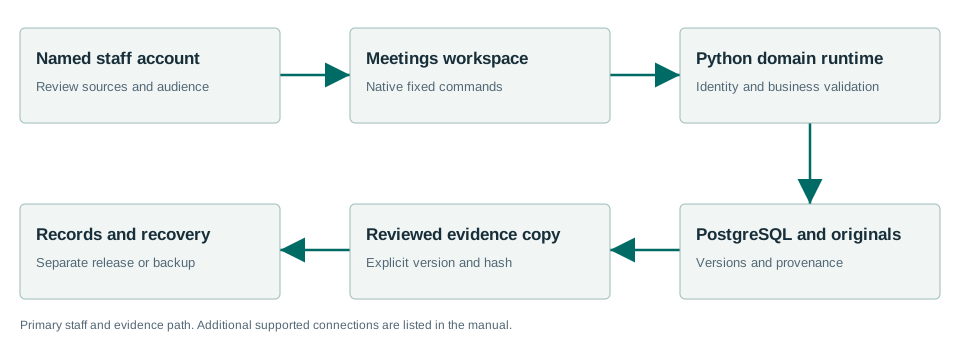
Provides evidence to Records, Code, Zoning and Planning, and meeting identity to Station. Code adoption and codification remain separate. Supporting Notice and Access do not replace clerk review.
Windows Sandbox acceptance passed.
The Windows acceptance summary records the workflows exercised with synthetic data on the released MSI. This is not a claim that every screen, vendor, upgrade or city equipment configuration has been certified.
Read the exact acceptance and limits →Ready to evaluate?
Begin with the current manual and download the Windows x64 beta 1.7.0.1. Configure the chosen test site and have its staff review source applicability and run the existing workflows.
The resident portal is deployed separately. See the Townlight Portal Guide for its workflow and acceptance limits.