Preserve evidence and review every draft finding.
Inspections retains original evidence, supplied observations and optional configured photo/audio analysis, then supports reviewed case workpapers and a separate Records copy. Automatic output is a draft for inspector review.
What the workflow delivers
- Create the case. Enter the property/case context and inspector observations. Keep staff-only notes and identifiers in their intended fields. Save before moving away from the workspace.
- Retain originals. Add original supported files using the existing evidence control. Inspect the filename, size and retained hash. Preserve originals separately from any derivative draft.
- Choose supplied or automatic text. Use supplied photo observations and a supplied voice summary for deterministic work. If configured, Analyse originals calls the image-capable provider and bundled audio transcriber. Read unavailable/failed results as such; do not label supplied text automatic.
- Review the analysis and citations. Compare automatic wording to the original evidence. Correct errors, uncertainty and Code citations. A model output is neither an official finding nor a notice.
Connected evidence
Consumes cited Code and Core contracts; supplies a reviewed copy to Records. It does not imply an automatic permit-system or enforcement-system writeback.
Know the beta boundary
The bundled Whistle CPU engine executes raw-audio transcription. Automatic photo analysis requires explicit vision configuration; missing configuration reports unavailable. Synthetic execution proves that adapters run, not field recognition accuracy. No official citation/fine issuance, inspection scheduling or enforcement-system writeback is provided.
Where the evidence goes
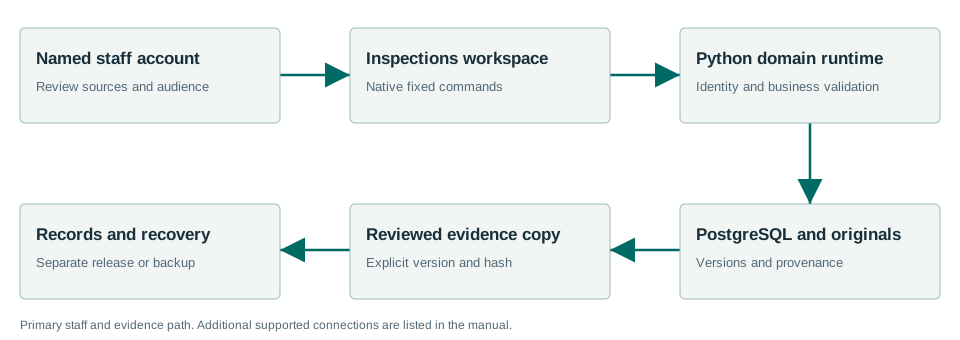
Consumes cited Code and Core contracts; supplies a reviewed copy to Records. It does not imply an automatic permit-system or enforcement-system writeback.
Windows Sandbox acceptance passed.
The Windows acceptance summary records the workflows exercised with synthetic data on the released MSI. This is not a claim that every screen, vendor, upgrade or city equipment configuration has been certified.
Read the exact acceptance and limits →Ready to evaluate?
Begin with the current manual and download the Windows x64 beta 1.7.0.1. Configure the chosen test site and have its staff review source applicability and run the existing workflows.