A shared foundation for accountable municipal work.
Core provides the shared contracts, ingestion, identity helpers, task infrastructure and recovery foundation used by Townlight. Staff encounter these capabilities through Setup, Settings and System Health. Business decisions stay with their owning product.
What the workflow delivers
- Complete setup. Choose folders and the full product composition. Create the city profile and the first named administrator. Choose a protected backup location. Defer optional local AI if it is not needed.
- Activate the runtime. Run the first-run health check, wait for readiness and open Townlight. In System Health select Finish Records Migration to activate the canonical Python and PostgreSQL services. A running process alone is not a ready database.
- Create staff access. Use Settings to create named staff. Sign out and confirm that staff can sign in with their own account. Keep administrator privileges with people responsible for setup; ordinary staff cannot administer users.
- Import through the right product. Use the source library of Code, Zoning, Planning or Permitting. Inspect provenance and permissions there. Core ingestion helpers do not bypass the owning product’s source review.
Connected evidence
All products use selected Core contracts. Core does not create unrestricted access between products. Access and Notice provide the bounded staff workflows described in their current manuals and acceptance summary.
Know the beta boundary
Shared catalog, exemption and module-generator code exists in the released Windows beta. It is not a centrally hosted federation service. A business product still owns its decisions, identity mapping and permission checks. Historical placeholder ADRs are retained as history, rather than descriptions of the current implementation.
Where the evidence goes
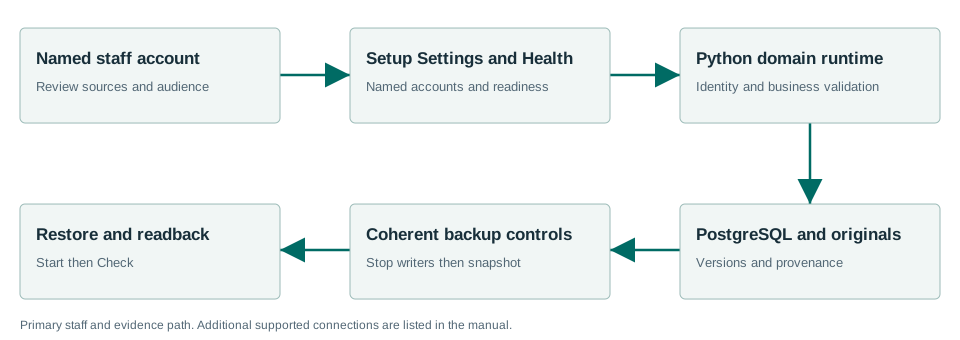
All products use selected Core contracts. Core does not create unrestricted access between products. Access and Notice provide the bounded staff workflows described in their current manuals and acceptance summary.
Windows Sandbox acceptance passed.
The Windows acceptance summary records the workflows exercised with synthetic data on the released MSI. This is not a claim that every screen, vendor, upgrade or city equipment configuration has been certified.
Read the exact acceptance and limits →Ready to evaluate?
Begin with the current manual and download the Windows x64 beta 1.7.0.1. Configure the chosen test site and have its staff review source applicability and run the existing workflows.