Prepare for the dais
Assemble packet documents, create notice workpapers and retain posting proof.

Prepare the agenda, assemble the packet, record the decisions and keep the approved proceedings connected to their original material.
Windows public beta · Townlight 1.8.1.1 · AGPL-3.0-only
Illustrated workflow · staff review at each decision
Assemble packet documents, create notice workpapers and retain posting proof.
Keep motion and vote corrections, action items, and adopted minutes with the meeting.
Link a Code proposal to its adopted decision or pass meeting context to a separately configured Station.
Enable Meetings in the Windows suite. Create a test meeting and walk one agenda item through packet preparation, vote, minutes and archive.
Clerks review and adopt proceedings. Resident website deployment and Station media configuration each have their own setup.
Read the installed acceptanceTrace the workflow to the component source pinned by the Windows release. Use the reference for integration details and the repository to report an issue or contribute a change.
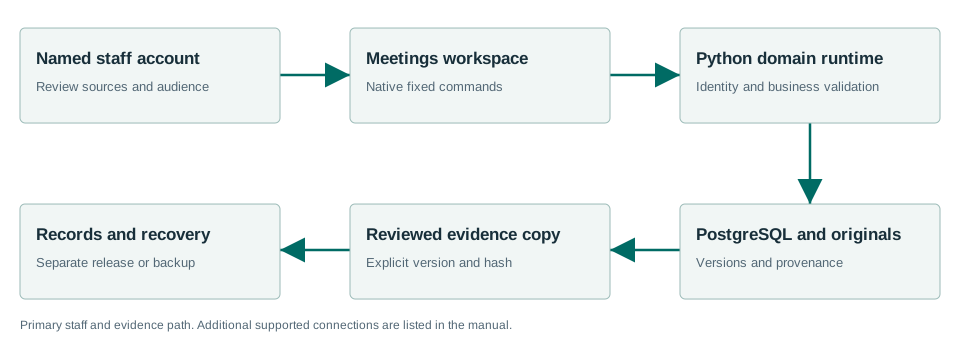
Windows 1.8.1.1 adds shared meeting imports for 31 source families, with 34 supported source/format pairs. Installed Windows Sandbox checks exercised preview, save and durable readback using public captures and fixtures, plus the documented Townlight handoffs. These checks do not establish automatic discovery on every live portal or a complete retest of every module.
All 31 sources, formats, operator steps and integration contracts · Installed acceptance and limits.
Windows 1.8.1.1 has fresh-install acceptance. An in-place upgrade to 1.8.1.1 was not exercised. The previous Windows 1.8.0.1 release tested upgrade from 1.7.2.1; that result applies to 1.8.0.1. Before an existing-city evaluation, back up city data and settings, close Townlight, keep the existing %LOCALAPPDATA%\CivicSuite profile, and use the same Windows account. Keep the prior installer and a restore path. Station continues to use its separately configured service.
The accepted MSI contains Townlight Runtime 0.3.1 and Meetings 1.0.6 distributions. Its health version strings still report Runtime 0.3.0 and Meetings 1.0.5. Default-branch source corrects those display strings; the signed MSI and its exact build source remain unchanged.