Keep the original bytes
Retain evidence provenance even as staff revise the case or the report.

Preserve original inspection evidence, connect it to cited rules and prepare a draft workpaper for an inspector to review.
Preview · Townlight 1.8.1.1 · AGPL-3.0-only
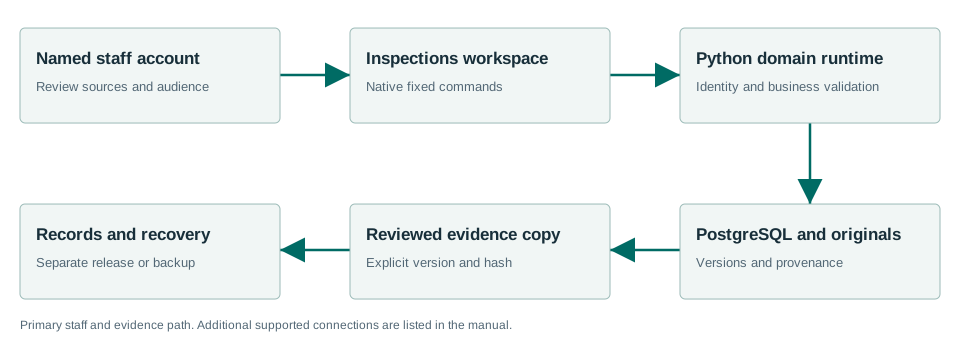
Illustrated workflow · staff review at each decision
Retain evidence provenance even as staff revise the case or the report.
Keep observations, Code sections and the draft analysis in one workpaper.
Review the case and prepare a separately redacted copy for the Records workflow.
Use the Inspections preview composition of the Windows beta. Start with synthetic evidence and a known Code citation.
Preview scope covers evidence and staff workpapers. The released Windows evaluation did not establish automatic photo or audio interpretation.
Read the installed acceptanceTrace the workflow to the component source pinned by the Windows release. Use the reference for integration details and the repository to report an issue or contribute a change.
Windows 1.8.1.1 adds shared meeting imports for 31 source families, with 34 supported source/format pairs. Installed Windows Sandbox checks exercised preview, save and durable readback using public captures and fixtures, plus the documented Townlight handoffs. These checks do not establish automatic discovery on every live portal or a complete retest of every module.
All 31 sources, formats, operator steps and integration contracts · Installed acceptance and limits.
Windows 1.8.1.1 has fresh-install acceptance. An in-place upgrade to 1.8.1.1 was not exercised. The previous Windows 1.8.0.1 release tested upgrade from 1.7.2.1; that result applies to 1.8.0.1. Before an existing-city evaluation, back up city data and settings, close Townlight, keep the existing %LOCALAPPDATA%\CivicSuite profile, and use the same Windows account. Keep the prior installer and a restore path. Station continues to use its separately configured service.
The accepted MSI contains Townlight Runtime 0.3.1 and Meetings 1.0.6 distributions. Its health version strings still report Runtime 0.3.0 and Meetings 1.0.5. Default-branch source corrects those display strings; the signed MSI and its exact build source remain unchanged.